Hello! I ran into an issue as I was running GetTemplateTask on the DP2 deep coadds. I was assuming that the code I had written for DP1 would carry over to EDP2 but then I learnt that the format of the deep coadds are now of the type ‘lsst.images.cells._coadd.CellCoadd’. However this format is incompatible for lsst.ip.diffim.GetTemplateTask and I’m the code that I had written for DP1 is not running. I would appreciate if someone suggests a fix for this. Thanks a lot!
getTemplateTask = GetTemplateTask()
            new_image = getTemplateTask.run(
            coaddExposure={tract_number:[coadd_get[filt]]},
            bbox=Box2I(small_box),wcs=new_wcs,
            dataIds={tract_number:[did_get[filt]]},
            physical_filter=filt,)

AttributeError: 'CellCoadd' object has no attribute 'get'
Firstly the API changed about 18 months ago so that the coaddExposures parameter is now called coaddExposureHandles – I’m surprised you aren’t getting an error message about that. I am also slightly confused in that your code is using coaddExposure when the parameter used to be called coaddExposures. This was done to reduce memory usage since that task now only reads the pixel data when it needs it rather than reading all the pixels up front.
Since coaddExposureHandles takes deferred handles from butler you need to get those using butler.getDeferred instead of butler.get.
Also many of the existing Tasks do not work with the new python image types. A CellCoadd can not be used where the API wants an ExposureF. You can get an ExposureF by passing in storageClass="Exposure" to your get or getDeferred call.
Thanks a lot! I should’ve added that initially I had coaddExposures throw up an error and I rectified it by using coaddExposureHandles but I ended up pasting the earlier message. I wasn’t familiar about the deferred handles aspect but it’s great to learn this.
This seems to work until I run into the error-
UnknownComponentError: "Requested component (photoCalib) not understood by this DatasetType (DatasetType('deep_coadd', {band, skymap, tract, patch}, CellCoadd))"
So, if I understand this correctly GetTemplateTask expects the photoCalib component that has been phased out and it is not compatible with the CellCoadd type?
Photo calib is called something else now. As I tried to say above, when you create your deferred handle you need to specify the override storage class of ExposureF to convert the deep coadd to the old python class. This task has not been updated to use the new data model.
It turns out there are a few more bugs to be fixed – namely, that passing storageClass = "Exposure" to a butler.getDeferred call (as suggested above) isn’t working yet. But in the meantime here is a validated workaround for making multi-patch cutouts with the DP2 deep coadd images. You should be able to replace the coordinates and filter with your desired coordinates and filter – provided that the requisite deep coadd images exist at that location for that filter in DP2.
import matplotlib.pyplot as plt
from lsst.daf.butler import Butler
import lsst.afw.display as afwDisplay
from lsst.sphgeom import Box as SphBox
from lsst.geom import Box2I, Point2I, SpherePoint, degrees
from lsst.ip.diffim import GetTemplateTask
from lsst.pipe.base import InMemoryDatasetHandle

butler = Butler("dp2", collections="dp2")
afwDisplay.setDefaultBackend('matplotlib')

ra_bcg = 53.0086808
dec_bcg = -28.3503446
box_size_deg = 0.1
my_band = 'i'

region_bbox = SphBox.fromDegrees(ra_bcg - box_size_deg, dec_bcg - box_size_deg,
                                 ra_bcg + box_size_deg, dec_bcg + box_size_deg)

dataset_refs = butler.query_datasets(
    "deep_coadd",
    where=f"patch.region OVERLAPS(region) and band in ('{my_band}')",
    bind={"region": region_bbox})
set_refs = set(dataset_refs)

first_deep_coadd = butler.get(dataset_refs[0], storageClass="Exposure")
sci_wcs = first_deep_coadd.wcs

sci_bbox = Box2I(
    Point2I(sci_wcs.skyToPixel(SpherePoint(ra_bcg - box_size_deg,
                                           dec_bcg - box_size_deg, degrees))),
    Point2I(sci_wcs.skyToPixel(SpherePoint(ra_bcg + box_size_deg,
                                           dec_bcg + box_size_deg, degrees))),
)

sorted_data = {}
for ref in set_refs:
    dataid = ref.dataId
    band_container = sorted_data.setdefault(dataid["band"], dict())
    tract_container = band_container.setdefault(dataid["tract"], list())
    tract_container.append(ref)
mapping = sorted_data[my_band]

getTemplateTask = GetTemplateTask()
new_template = getTemplateTask.run(
    coaddExposureHandles = {tract: [InMemoryDatasetHandle(butler.get(ref, storageClass="Exposure")) for ref in refs] for tract, refs in mapping.items()},
    bbox = sci_bbox, wcs = sci_wcs, physical_filter = my_band,
    dataIds={tract: [ref.dataId for ref in refs] for tract, refs in mapping.items()}
)

fig = plt.figure(figsize=(8, 8))
display = afwDisplay.Display(frame=fig)
display.scale('asinh', 'zscale')
display.image(new_template.template.image)
plt.show()
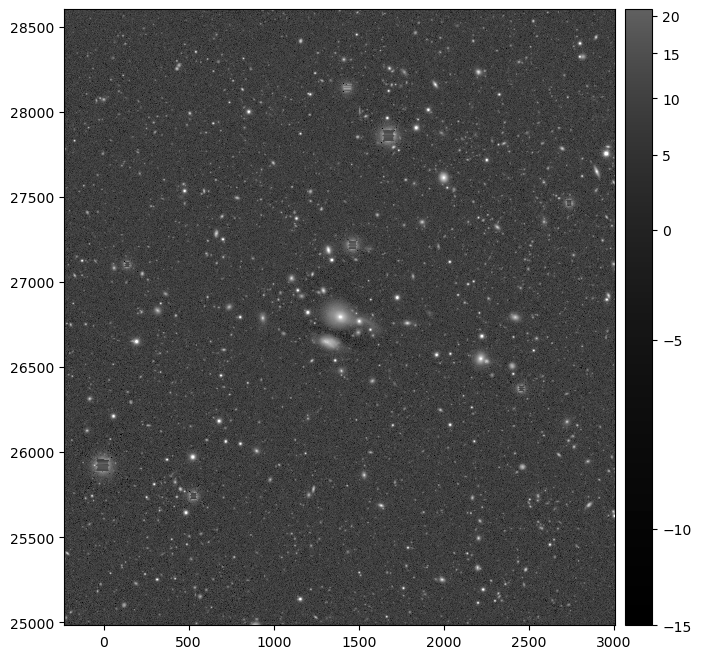
The above example should display a large i-band deep coadd cutout like this:
I’ve marked the reply post above as the solution to this topic, but if that doesn’t work for your case or if you run into new issues, just unmark it and keep the discussion going, or open a new topic any time for new or related issues.
As this solution is a workaround, we’re going to hold off on updating the DP2 tutorial for big deep coadd cutouts until we have a more thorough fix. Anyone reading this thread later should check for a DP2 tutorial notebook on multi-patch “composite” cutouts for the latest guidance on how to make these.