I have been following the tutorials here: LSDB — LSDB, and am having some trouble with installing the correct version of lsdb. I am working in an RSP notebook environment, where the default version of lsdb is 0.6.4. Using the command suggested in Section 1.1.1 here: Accessing Rubin Data Preview 1 (DP1) — LSDB, %pip install -U lsdb, fails to install a functioning version of lsdb and also appears to break the rest of the environment such that packages like astropy no longer work.
Although Section 1.1.1 of the tutorial states that the minimum version requirement is 0.6.3 (so 0.6.4 should be sufficient), the ‘Getting Started’ page suggests at least version 0.8.1: Getting Started with LSDB — LSDB. I am looking for some advice on what version is actually best to use, and how to install it if I have the incorrect version.
Hi @aordog, thanks for posting. When working with LSDB at data.lsst.cloud, the tutorial that is designed to work within the RSP environment is this one: 102.5. LSDB data access — DP1. For RSP-based analysis of DP1, it’s best to start there and use that version of the code, and the LSDB files that the tutorial accesses.
I’m going to mark this response as the solution – but if it doesn’t meet your needs, please unmark it and respond in thread, and we’ll keep up the discussion, thanks!
Hi Melissa. Thank you for your very quick reply! My apologies - I didn’t quite provide enough information in my initial question. I am looking to test out cross-matching DP1 with non-Rubin data sets stored in HATS format here: https://data.lsdb.io/. I had worked through the tutorial you linked and it was very helpful. But then I followed the link at the end of that tutorial and that’s how I ended up at the LSDB pages. Is it the case that those tutorials don’t necessarily work well within the RSP environment? I found parts of the tutorials to work on RSP, but not all. Thanks again!
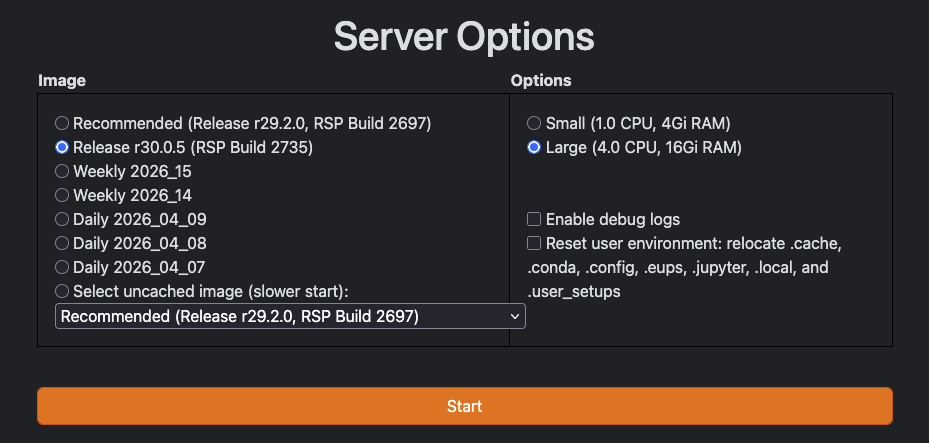
Hi Anna, thanks for posting! We do intend for all the tutorials at 6. Working with Rubin Data — LSDB to work on the RSP; however, it does appear that the Recommended RSP Build is using lsdb 0.6.4.
Can you try out using one of the recent RSP builds?
Hi @OliviaLynn. Thank you so much for your reply! I have marked this as resolved, because switching to a more recent RSP build does in fact answer my question about how to access the latest version of LSDB. However, I was mistaken in assuming that the version was the cause of the problems I was running into. I will attend the office hours today to ask further questions. Thank you for letting me know about that!